
Burnout Extreme Drift 2
Description
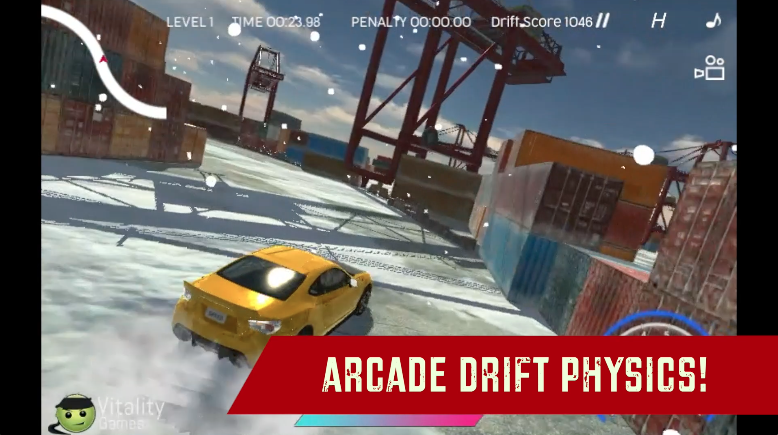
Get behind the wheels of 5 stunning drift cars and show how you drift through the asphalt in this awesome 3D Car racing game. Complete up to 20 challenging races in RACING and DRIFT game modes. Customize your car with cool colors and ride in style through the detailed racing maps. Make long and sustained drifts with the arcade drift physics of the game. Go against the toughest racing talent in the city and show your racing skills by beating all the Tough AI opponents of the city. Are you ready to show your racing skills? Prove yourself with Burnout Extreme Drift 2!

Our Take On The Game!
Burnout Extreme Drift 2 is a great arcade-style drift racing game. The graphics are fantastic and the UI is very polished. All 5 cars look pretty decent, however, the drifting feels a little unrealistic as it feels like you’re driving on ice. Although the drifting is very controllable still it is very hard to make a clean lap without any crashes or bumps during the races.
Speaking of drifting games, check out our favorite drift game Drift Hunters on MotorHeads.com. It has an insane 26-car collection for you to unlock and the best drifting physics on the web. The game also has a huge map collection of 10 drift maps. The best part is that you can tune your car, customize it and upgrade it as you wish.
How to play and get started with Burnout Extreme Drift 2?
Controls
Arrow Keys/ W,A,S,D: Drive/Steer/ Brake Ctrl: Nitro Spacebar: HandBrake
Objective
This game is a level-based racing game, there are up to 20 races for you to complete in RACING and DRIFT modes. You can unlock the next race by finishing the current race and reaching the finish line.
-
DRIFT MODE: Make the highest drift score before the timer goes up or you finish all the laps.
-
RACING MODE: Beat your rival opponent in stunning race courses and go head to head with a single racer and beat’em all one by one.
NOTE: We recommend using Nitro only in RACING mode when you’re driving on straight roads to get ahead of the AI opponent.
Starting The Game!
-
Click on the ’PLAY’ button in yellow located at the BOTTOM RIGHT of the screen. (marked by red arrow)

-
Click on the ’PLAY’ button in yellow again to proceed to car selection located at the BOTTOM RIGHT of the screen. (marked by red arrow)
Car Selection
-
Browse through all the cars with the white arrows located at the right and left of the screen. (marked by blue arrows)
-
Click on the ’SELECT’ on the BOTTOM RIGHT to select the car.
-
You can buy the car by clicking the ’BUY’ button in yellow located at the BOTTOM LEFT of the screen. (marked by red arrow)
Car Color Paint
-
In the CAR SELECTION screen, click on the ’PAINT’ button in white located at the TOP RIGHT of the screen. (marked by red arrow)
-
You can select the color of your car by dragging the yellow cursor on the RGB hue square. (marked by red arrow) You can also select the intensity of your selected color by dragging the cursor on top of the hue square. (marked by blue arrow)
-
Click on the ’BUY’ button in yellow located at the BOTTOM LEFT of the screen to buy the selected color. (marked by green arrow)
-
Click on the ’NEXT’ button to move forward to mode selection.
Game Mode Selection
-
Choose what game mode you’d like to do RACING or DRIFT by clicking on one of the image buttons. (marked by red arrows)
-
Clicking on either of the buttons will load the level selection screen.
Level Selection
-
Working of level selection is the same for both of the game modes. For this example, we will proceed with the RACING section.
-
Browse through all the levels with the white arrows located at the right and left of the screen. (marked by blue arrows)
-
Click on the ’PLAY’ button in white located at the BOTTOM RIGHT to play the current unlocked level. (marked by red arrow) You can also play any level by clicking on any of the unlocked levels that do not have a locked image on TOP LEFT. (marked by green arrows)
That’s all there is to it, you’re all set to trail through the asphalt roads.
FAQs
Is there any difference between the cars?
Yes, all the cars have ascending values of speed and brake pressure. The costlier the car is, the higher the values are.
What is the fastest car in the game?
The fastest car in the game is the Toyota Supra.
Which is the best drift game on the web?
The best drift game on the web is Drift Hunters on MotorHeads.com. It has an insane 26-car collection for you to unlock and the best-drifting physics on the web. The game also has a huge map collection of 10 drift maps.
Who made Burnout Extreme Drift 2?
This game is developed by VitalityGames. Check out their hit game Cartoon Mini Racing on MotorHeads.com.
Are there any upgrades available in this game?
No, there are no upgrades available for any car in the game.
How to save progress in this game?
The game data is saved in the browser cache. Make sure you don’t delete your browser cache or data. Otherwise, You can lose all your game progress.
Gameplay
Screenshots



Similar/Alternative Games
-
Real Drive: More cars and better drift physics.
-
[Drift ClubCHAMP_A_TRADUIRE_D(https://www.motorheads.com/games/drift-club-ar6323/) Cool beginner-friendly drifting game with tons of cars.